3DMakerpro Moose 3D Scanner
Brand: 3DMakerpro
Availability: in stock
Product Description
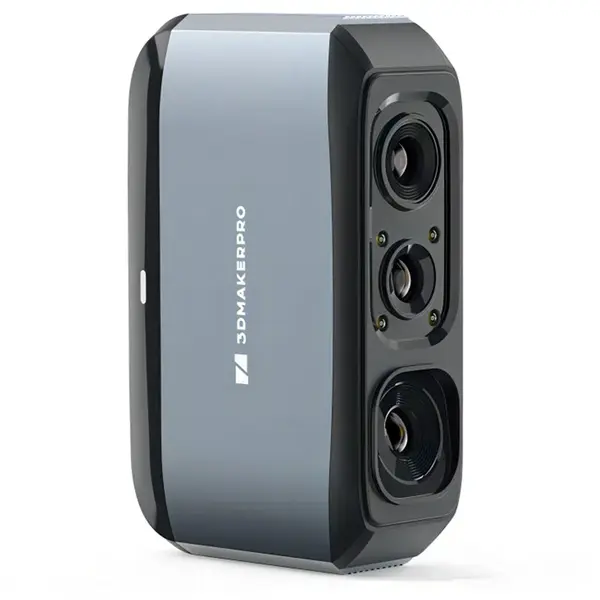
3DMAKERPRO Moose - AI-powered 3D scanner with an accuracy of 0.03 mm3DMAKERPRO Moose goes beyond being just a high-precision scanner; it offers a more intelligent approach to scanning. Applying advanced AI tracking and a cutting-edge point cloud algorithm Moose enhances both the efficiency and quality of your scanning to unprecedented levels by achieving a single frame accuracy of 0.03 mm.0.03mm Accuracy0.07mm Resolution24-bit color texture scanningAbout 3DMAKERPROEstablished in 2015 3DMakerpro is dedicated to providing users with high-quality and affordable 3D scanners enabling individuals to bring their 3D creations to life. With a focus on research and development 3DMakerpro has created cutting-edge software algorithms including multi-spectral projection systems visual tracking no-marking registration algorithms and automatic model processing algorithms. Additionally the company has developed its own fully automatic high-precision optical calibration system.Marker Free TechnologyNo markers are needed scan with ease. It's also a true "Time-saver"! 3DMakerpro Moose 3D scanners are equipped with a new generation of single-frame encoded structured light units that improve surface feature detection for smooth marker-free scanning.True-to-life AccuracyWith blue light technology 3DMakerpro 3D Scanner Moose can achieve 0.03mm accuracy. This makes your model size infinitely approach reality. With 0.07mm resolution detailed point clouds perfectly preserve object details providing refined models for printing or display projects.AI Visual TrackingAI algorithm intelligent identification of scanned vulnerabilities achieving fully automated model repair. With AI Visual Tracking Technology 3DMakerpro handheld 3D scanner Moose can easily detect vulnerabilities achieving fully automated 3D model repair.True Color RevealThe 3D scanner for 3D printing Mole equipped with 24-bit color camera supports 100% ture color restoration. 24-bit color camera adds vivid color contrast and intricate details to models.Anti-Shake ModulesEquipped with optical anti-shake modules 3DMakerpro 3D model scanner Moose is more "Beginner-friendly" so you no longer have to worry about shaky hands. In addition the "re-scanning" function is now available allowing you to continue scanning even if interrupted.Up to 100mm Scan DepthEnhanced depth exploration significantly improves vertical scanning capabilities to comprehensively capture complex models even those with intricate structures.Life-time Free OTA SoftwareJMStudio scanning software integrates scanning editing and optimization into one seamless process. The accompanying JMStudio software allows you to visually see the entire scanning process with free lifetime OTA upgrades to enhance your scanning experience.3DMAKERPRO Moose 3D ScannerFlagship Medium-Format Scanner0.03mm Accuracy0.07mm Resolution10fps Frame Rate24-bit Color TextureAl Visual TrackingOptical Anti-shake ModulesMoose 3D ScannerFlagship Medium-Format ScannerAl EmpowermentMaking 3D Smarter With Al Tracking and Innovative Point Cloud Algorithm making it simpler to obtain perfect 3D models with Moose Series Scanners!With 0.07mm resolutionDetailed point clouds perfectly preserve object details providing refined models for printing or display projects.Surveying-grade HardwareProfessionalizing Application ScopeWith blue light technology the moose series brings your model infinitely closer to reality.Create Vibrant 3D ModelUp to 0.03mm AccuracyBlue light technology allows moose to reach 0.03mm accuracy.True Color RevealEquipped with 24-bit color camera supports 100% true color restoration.Faster Scanning for Medium ObjectsRuns on Nearly EverythingAll-in-one Scanning & EditingFast Model SharingEasy-to-use UlCompatible with Leading 3D SoftwareExports OBJ/STL/PLY ASCInitial Setup Guide and TipsStep 1: DeviceConnecting the scanner to a USB 3.0 port which is highly recommended for faster data transfer.A USB without sufficient power may lead device not showing any images. It is recommended to try other USB 3.0 ports if that happens.Step2: Preview and AdjustmentClick "Start Scanning" in splash screen and will go into scanning preview. In the preview the Work Panel will switch into "Asjust" panel.Select proper splicing mode (Geometry & Texture); adjust the distance between object and scanner to "excellent".Then follow the steps below to complete the scan: Preview - Intialization - Scan.Step3: ProcessCheck the processing steps you need for your point cloud data in the Work Panel_Process; click "Process" on the 3D Viewer.Note: Here "Texture Mapping" refers to the texture capturing by the scanner itself. If you need to do "External Texture Mapping" please uncheck this step.Requiring Special Treatment Before ScanningTransparant Objects(glass products plastic bottles etc.)Deformable Objects(clothes animals etc.)Reflective Shinny Objects(metal products electroplated parts etc.)
Specifications
- Condition: new
- GTIN/EAN: 6982530498395
- Seller/Program: GeekBuying
Price History
Available in other shops